The Case for Precision in Item 12
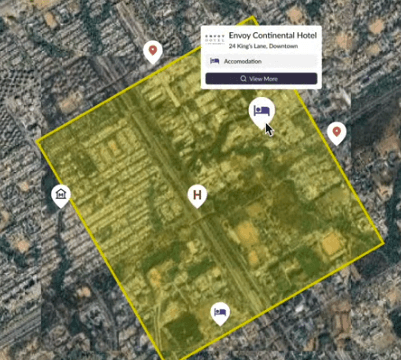
If you franchise, your disclosure lives or dies on clarity. Item 12 of the Franchise Disclosure Document (FDD) is where you define who gets to sell where, under what conditions, and with what exceptions. That language is read by prospective franchisees, scrutinized by their counsel, and—if things go sideways—reviewed by regulators or a court. Ambiguous, hand‑drawn, or stale territory boundaries invite confusion. Accurate, reproducible maps make your Item 12 disclosures concrete.
The Problem: Ambiguity, Encroachment, and Outdated Inputs
Ambiguity creeps in when boundaries rely on crude shapes (simple radii), unstable geographies (ZIP Codes), or outdated demographics. Circular buffers ignore real travel time; a 5‑mile radius downtown is not the same as 5 miles on a freeway. ZIP Codes are postal routes that change; using them as fixed polygons creates gray areas. And when population inputs are out of date, the size and potential of a territory can be mis-stated.
Operationally, this vagueness shows up later as: competing franchisees arguing about overlap, franchisees assuming exclusivity that wasn’t intended, and friction over online sales or alternative channels that weren’t clarified alongside the map. The common thread: the map wasn’t built from a defensible method—and the FDD text didn’t precisely match the map.
The Solution: Reproducible GIS + Documented Rules
Start with the network, not a circle. Build territories as drive‑time polygons so boundaries reflect real accessibility.
Define a population threshold. Instead of guessing at “how big,” define “how many.” For example: “Each territory will contain approximately 50,000 residents as measured by the current LandScan dataset inside a 20‑minute drive‑time polygon from the approved address.” This is easy to validate and scale.
Pick a demographic source and version it. Choose one population dataset (we use LandScan and WorldPop) and document version/year. When the dataset updates, you control when territories are re‑evaluated.
Mirror the rules in Item 12. Whatever logic produces the map must appear in the Item 12 narrative: exclusivity (or not), relocation rules, whether HQ can sell into a territory (e‑commerce/alt channels), and how future adjustments occur.
Archive every territory. Keep a dated export (PDF and GeoJSON/SHP) for each award with the dataset version and parameters used. That audit trail de‑risks renewals and transfers.
What This Looks Like in Population Explorer
Set your seed point (the franchise location).
Select a drive‑time (e.g., 15 or 20 minutes) appropriate for your model customer.
Evaluate population using LandScan’s ambient population or WorldPop's forecaststo ensure consistent potential across territories.
Inspect conflicts against existing territories; adjust the seed point or time if needed.
Export artifacts: a branded PDF map for the award packet and a GeoJSON/KML for the master territory ledger.
Note parameters (dataset, date, threshold, time) in the territory’s internal record and ensure Item 12 language references the same rules.
Common Pitfalls (and Fixes)
Using circles instead of the road network. Fix: drive‑time polygons.
Building on ZIP or Postal Codes. Fix: avoid ZIPs; if you must use them for operations, use Census ZCTAs as a stable proxy and document the list used.
Unstated e‑commerce carve‑outs. Fix: disclose internet and alternative channels alongside the map.
No version control. Fix: record dataset (e.g., LandScan 2023), export date, and parameters.
No population parity. Fix: equalize potential customers, not just area.
Benefits You Can Quantify
Compliance clarity: Item 12 mirrors the map rules.
Faster sales cycles: prospects understand their protected area at a glance.
Fewer disputes: clear, archived boundaries reduce overlap fights.
Operational scale: new awards use the same playbook.
Conclusion & CTA
The cleanest FDDs pair precise Item 12 language with reproducible, archived maps. If you want territories that sell quickly and stand up under scrutiny, build them on networks with documented population thresholds—and keep the FDD in lockstep with the map.
Next step: See how franchisors use Population Explorer to design, audit, and export territories.


