B2B SaaS Territory Mapping

B2B SaaS Territory Mapping

B2B SaaS Territory Mapping

B2B SaaS Territory Mapping

Design balanced SaaS sales territories with ICP-rich geographies, drive-time catchments, and CRM-ready exports to maximize ARR growth.

Design balanced SaaS sales territories with ICP-rich geographies, drive-time catchments, and CRM-ready exports to maximize ARR growth.

Design balanced SaaS sales territories with ICP-rich geographies, drive-time catchments, and CRM-ready exports to maximize ARR growth.

Why It Matters

Territory Mapping Challenges for SaaS

Territory Mapping Challenges for SaaS

In SaaS, territory design has shifted from simple geography to balancing account potential and ARR growth. With inside and hybrid sales dominating, fair and transparent territories are essential to keep reps motivated, reduce conflict, and capture whitespace in high-growth metros.


Smart Territory Design for SaaS Sales

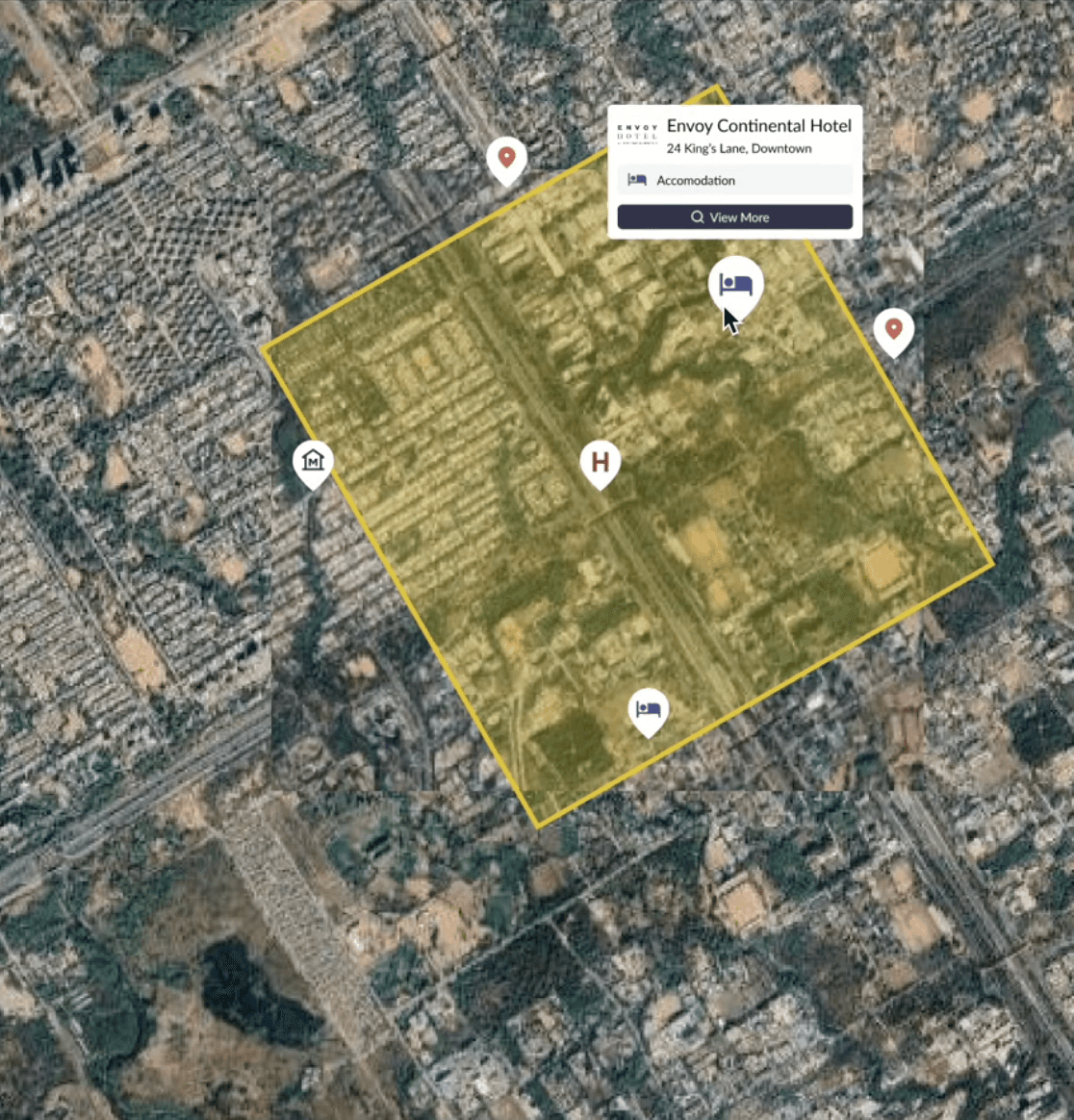
Population Explorer brings clarity by mapping ICP hotspots across metros, layering current population, income, and Google POIs to highlight the best SaaS opportunity zones. Drive-time tools help model partner or field coverage pods, while exports to CSV, Shapefile, or KML allow clean sync with CRMs for lead routing and account assignments.

How PopEx Helps

Smart Territory Design for SaaS Sales

Population Explorer brings clarity by mapping ICP hotspots across metros, layering current population, income, and Google POIs to highlight the best SaaS opportunity zones. Drive-time tools help model partner or field coverage pods, while exports to CSV, Shapefile, or KML allow clean sync with CRMs for lead routing and account assignments.

How PopEx Helps

Smart Territory Design for SaaS Sales

Population Explorer brings clarity by mapping ICP hotspots across metros, layering current population, income, and Google POIs to highlight the best SaaS opportunity zones. Drive-time tools help model partner or field coverage pods, while exports to CSV, Shapefile, or KML allow clean sync with CRMs for lead routing and account assignments.

How PopEx Helps

Why PopEx is Different

Unlike generic mapping tools, PopEx emphasizes ease-of-use and SaaS-specific workflows. Our platform combines current population datasets, Google POI enrichment, and instant exports, ensuring sales ops leaders can rebalance territories in minutes, not days. Transparency builds rep trust and alignment across hunters, farmers, and partner teams.

Differentiators

Why PopEx is Different

Unlike generic mapping tools, PopEx emphasizes ease-of-use and SaaS-specific workflows. Our platform combines current population datasets, Google POI enrichment, and instant exports, ensuring sales ops leaders can rebalance territories in minutes, not days. Transparency builds rep trust and alignment across hunters, farmers, and partner teams.

Differentiators

Why PopEx is Different

Unlike generic mapping tools, PopEx emphasizes ease-of-use and SaaS-specific workflows. Our platform combines current population datasets, Google POI enrichment, and instant exports, ensuring sales ops leaders can rebalance territories in minutes, not days. Transparency builds rep trust and alignment across hunters, farmers, and partner teams.

Differentiators

Better Quota Attainment Through Balanced Territories

SaaS leaders use PopEx to rebalance mid-market patches, reduce conflicts between inside and field reps, and ensure top metros aren't over- or under-assigned. With transparent maps and fair potential models, sales teams achieve quota more consistently while reducing conflict over account ownership.

Proof in Action

Better Quota Attainment Through Balanced Territories

SaaS leaders use PopEx to rebalance mid-market patches, reduce conflicts between inside and field reps, and ensure top metros aren't over- or under-assigned. With transparent maps and fair potential models, sales teams achieve quota more consistently while reducing conflict over account ownership.

Proof in Action

Better Quota Attainment Through Balanced Territories

SaaS leaders use PopEx to rebalance mid-market patches, reduce conflicts between inside and field reps, and ensure top metros aren't over- or under-assigned. With transparent maps and fair potential models, sales teams achieve quota more consistently while reducing conflict over account ownership.

Proof in Action

Last updated

Oct 11, 2025

Population Explorer

What Our Users Are Saying

What Our Users Are Saying

What Our Users Are Saying

Frequently Asked Use Cases

Frequently Asked Use Cases

Frequently Asked Use Cases

How B2B SaaS territory mapping works in practice

Designing SaaS sales territories requires more than drawing boundaries. Coverage models vary by segment (SMB, mid-market, enterprise) and role (SDR, AE, CSM). SMB reps may work high-velocity inbound, while enterprise AEs work a smaller book of named accounts. Without careful mapping, one team can inherit an outsized portion of high-value accounts while others face sparse coverage.

  1. Define or import territories - Draw regions, load ZIP lists, or import existing CRM assignments for review.

  2. Layer demand and access - Use LandScan and WorldPop demographics, plus Google Places POIs, to assess commercial hubs, coworking clusters, and employment corridors. This helps align territory size with ICP concentration.

  3. Export for operations - Generate ZIP lists, shapefiles, and formatted reports for RevOps, finance, and sales leadership. Outputs can be pushed to CRM, aligning quotas with fair opportunity.

This workflow supports rebalances during hiring or fiscal planning and gives leadership a defensible rationale for quota setting. Background: How to Create a Sales Territory Map and About Our Data.

SaaS-specific example: Enterprise reps often require larger territories with fewer but high-value accounts, while SMB reps cover denser regions with high velocity. PopEx enables leaders to model both, aligning inbound leads with SDR teams and outbound coverage with account executives, ensuring balanced opportunity across product tiers.

FAQs for SaaS sales leaders

How do we balance territories fairly?
Use population and income as a proxy for opportunity, then calibrate against ICP account lists. Drive-time analysis with Isochrone Maps ensures fairness for field reps.

Can we import CRM accounts and prospects?
Yes. Upload CSVs or use structured formats. See Importing CRM Accounts and Working with Marker Files.

Which datasets power the model?
Population Explorer combines LandScan and WorldPop, updated annually, with Google Places POIs to highlight commercial clusters and employment hubs. Learn more in Census vs LandScan vs WorldPop.

How do we split SDRs and AEs across territories?
Many SaaS firms allocate SDRs by lead volume and AEs by quota potential. With PopEx, you can model population and commercial density separately to inform both roles.

Does this support SMB vs MM vs ENT coverage models?
Yes. SMB often uses ZIP-based clusters, MM balances regional coverage, and ENT relies on named accounts. PopEx can support mixed models by layering demographic potential with CRM account data.

How do we handle greenfield vs named accounts?
For greenfield, demographics and POIs drive equitable splits. For named accounts, overlays ensure balanced distribution of high-value targets across reps.

Can outputs sync with downstream systems?
Yes. Export ZIP lists, shapefiles, and reports; details in Import & Export.

How do we avoid overlap between teams?
Use transparent, non-overlapping boundaries, validate against ZIPs, and spot-check edge cases with POIs and isochrones.

Will this work for international coverage?
Yes. Global LandScan + WorldPop data supports SaaS companies expanding across regions, ensuring consistency in quota design.

How current is the data?
Census releases can lag by years. PopEx refreshes annually and incorporates projections, keeping pace with SaaS growth.

How do I align territories with product tiers?
Define boundaries around enterprise vs SMB hubs. Enterprise reps focus on fewer high-value accounts, while SMB reps cover dense clusters for velocity.

Can I prioritize based on cloud adoption or tech density?
Yes. Overlay POIs such as data centers, coworking spaces, and tech hubs to proxy for SaaS adoption readiness.

How do I support SDR/AE collaboration?
Territories can be subdivided to align SDR prospecting zones with AE ownership, ensuring seamless handoffs and efficient coverage.

Why census data can distort SaaS coverage potential

SaaS companies often sell into fast-growing urban corridors, coworking districts, or suburban office clusters. Decennial census tables may miss these shifts, leading to unfair quotas or travel inefficiencies.

Population Explorer corrects for this by providing annual LandScan and WorldPop updates, plus Google Places POIs for employment centers, coworking hubs, and tech corridors. For more background, see LandScan Deep Dive and How to Identify Population Trends.

Self-serve alternative to consultant redraws

Consultant redraws can't keep pace with SaaS go-to-market cycles. A self-serve tool ensures RevOps and sales leadership stay agile during hiring, product launches, or new fiscal years.

  • Agility - Run scenarios before QBRs, rebalance after headcount changes, and adjust quotas quickly.

  • Cost control - Reduce recurring spend on consultant projects.

  • Accuracy - Territories reflect LandScan, WorldPop, and Google Places data instead of outdated tables.

  • Alignment - RevOps, finance, and leadership can collaborate directly on live models.

Start here for more information.

Comparing approaches to SaaS territory mapping

Approaches differ in freshness, flexibility, and CRM interoperability:

  • Census-reseller maps - Often outdated and light on commercial context, which can skew quota potential.

  • Consultant PDFs - Useful snapshots, but static and costly to refresh during headcount changes.

  • Niche SaaS tools - Sometimes limited to U.S. markets or lacking robust export formats for RevOps pipelines.

Population Explorer combines global LandScan and WorldPop coverage with Google Places POIs and flexible exports. RevOps teams can overlay demographics with named-account lists, validate quota fairness, and export territory assignments for CRM. During QBRs, simulate "what-if" coverage: add AEs in a new region, split time-zone bands, or shift SMB to inside-only-without waiting weeks for a redraw. Getting started: Start Here and About Our Data.

How B2B SaaS territory mapping works in practice

Designing SaaS sales territories requires more than drawing boundaries. Coverage models vary by segment (SMB, mid-market, enterprise) and role (SDR, AE, CSM). SMB reps may work high-velocity inbound, while enterprise AEs work a smaller book of named accounts. Without careful mapping, one team can inherit an outsized portion of high-value accounts while others face sparse coverage.

  1. Define or import territories - Draw regions, load ZIP lists, or import existing CRM assignments for review.

  2. Layer demand and access - Use LandScan and WorldPop demographics, plus Google Places POIs, to assess commercial hubs, coworking clusters, and employment corridors. This helps align territory size with ICP concentration.

  3. Export for operations - Generate ZIP lists, shapefiles, and formatted reports for RevOps, finance, and sales leadership. Outputs can be pushed to CRM, aligning quotas with fair opportunity.

This workflow supports rebalances during hiring or fiscal planning and gives leadership a defensible rationale for quota setting. Background: How to Create a Sales Territory Map and About Our Data.

SaaS-specific example: Enterprise reps often require larger territories with fewer but high-value accounts, while SMB reps cover denser regions with high velocity. PopEx enables leaders to model both, aligning inbound leads with SDR teams and outbound coverage with account executives, ensuring balanced opportunity across product tiers.

FAQs for SaaS sales leaders

How do we balance territories fairly?
Use population and income as a proxy for opportunity, then calibrate against ICP account lists. Drive-time analysis with Isochrone Maps ensures fairness for field reps.

Can we import CRM accounts and prospects?
Yes. Upload CSVs or use structured formats. See Importing CRM Accounts and Working with Marker Files.

Which datasets power the model?
Population Explorer combines LandScan and WorldPop, updated annually, with Google Places POIs to highlight commercial clusters and employment hubs. Learn more in Census vs LandScan vs WorldPop.

How do we split SDRs and AEs across territories?
Many SaaS firms allocate SDRs by lead volume and AEs by quota potential. With PopEx, you can model population and commercial density separately to inform both roles.

Does this support SMB vs MM vs ENT coverage models?
Yes. SMB often uses ZIP-based clusters, MM balances regional coverage, and ENT relies on named accounts. PopEx can support mixed models by layering demographic potential with CRM account data.

How do we handle greenfield vs named accounts?
For greenfield, demographics and POIs drive equitable splits. For named accounts, overlays ensure balanced distribution of high-value targets across reps.

Can outputs sync with downstream systems?
Yes. Export ZIP lists, shapefiles, and reports; details in Import & Export.

How do we avoid overlap between teams?
Use transparent, non-overlapping boundaries, validate against ZIPs, and spot-check edge cases with POIs and isochrones.

Will this work for international coverage?
Yes. Global LandScan + WorldPop data supports SaaS companies expanding across regions, ensuring consistency in quota design.

How current is the data?
Census releases can lag by years. PopEx refreshes annually and incorporates projections, keeping pace with SaaS growth.

How do I align territories with product tiers?
Define boundaries around enterprise vs SMB hubs. Enterprise reps focus on fewer high-value accounts, while SMB reps cover dense clusters for velocity.

Can I prioritize based on cloud adoption or tech density?
Yes. Overlay POIs such as data centers, coworking spaces, and tech hubs to proxy for SaaS adoption readiness.

How do I support SDR/AE collaboration?
Territories can be subdivided to align SDR prospecting zones with AE ownership, ensuring seamless handoffs and efficient coverage.

Why census data can distort SaaS coverage potential

SaaS companies often sell into fast-growing urban corridors, coworking districts, or suburban office clusters. Decennial census tables may miss these shifts, leading to unfair quotas or travel inefficiencies.

Population Explorer corrects for this by providing annual LandScan and WorldPop updates, plus Google Places POIs for employment centers, coworking hubs, and tech corridors. For more background, see LandScan Deep Dive and How to Identify Population Trends.

Self-serve alternative to consultant redraws

Consultant redraws can't keep pace with SaaS go-to-market cycles. A self-serve tool ensures RevOps and sales leadership stay agile during hiring, product launches, or new fiscal years.

  • Agility - Run scenarios before QBRs, rebalance after headcount changes, and adjust quotas quickly.

  • Cost control - Reduce recurring spend on consultant projects.

  • Accuracy - Territories reflect LandScan, WorldPop, and Google Places data instead of outdated tables.

  • Alignment - RevOps, finance, and leadership can collaborate directly on live models.

Start here for more information.

Comparing approaches to SaaS territory mapping

Approaches differ in freshness, flexibility, and CRM interoperability:

  • Census-reseller maps - Often outdated and light on commercial context, which can skew quota potential.

  • Consultant PDFs - Useful snapshots, but static and costly to refresh during headcount changes.

  • Niche SaaS tools - Sometimes limited to U.S. markets or lacking robust export formats for RevOps pipelines.

Population Explorer combines global LandScan and WorldPop coverage with Google Places POIs and flexible exports. RevOps teams can overlay demographics with named-account lists, validate quota fairness, and export territory assignments for CRM. During QBRs, simulate "what-if" coverage: add AEs in a new region, split time-zone bands, or shift SMB to inside-only-without waiting weeks for a redraw. Getting started: Start Here and About Our Data.

How B2B SaaS territory mapping works in practice

Designing SaaS sales territories requires more than drawing boundaries. Coverage models vary by segment (SMB, mid-market, enterprise) and role (SDR, AE, CSM). SMB reps may work high-velocity inbound, while enterprise AEs work a smaller book of named accounts. Without careful mapping, one team can inherit an outsized portion of high-value accounts while others face sparse coverage.

  1. Define or import territories - Draw regions, load ZIP lists, or import existing CRM assignments for review.

  2. Layer demand and access - Use LandScan and WorldPop demographics, plus Google Places POIs, to assess commercial hubs, coworking clusters, and employment corridors. This helps align territory size with ICP concentration.

  3. Export for operations - Generate ZIP lists, shapefiles, and formatted reports for RevOps, finance, and sales leadership. Outputs can be pushed to CRM, aligning quotas with fair opportunity.

This workflow supports rebalances during hiring or fiscal planning and gives leadership a defensible rationale for quota setting. Background: How to Create a Sales Territory Map and About Our Data.

SaaS-specific example: Enterprise reps often require larger territories with fewer but high-value accounts, while SMB reps cover denser regions with high velocity. PopEx enables leaders to model both, aligning inbound leads with SDR teams and outbound coverage with account executives, ensuring balanced opportunity across product tiers.

FAQs for SaaS sales leaders

How do we balance territories fairly?
Use population and income as a proxy for opportunity, then calibrate against ICP account lists. Drive-time analysis with Isochrone Maps ensures fairness for field reps.

Can we import CRM accounts and prospects?
Yes. Upload CSVs or use structured formats. See Importing CRM Accounts and Working with Marker Files.

Which datasets power the model?
Population Explorer combines LandScan and WorldPop, updated annually, with Google Places POIs to highlight commercial clusters and employment hubs. Learn more in Census vs LandScan vs WorldPop.

How do we split SDRs and AEs across territories?
Many SaaS firms allocate SDRs by lead volume and AEs by quota potential. With PopEx, you can model population and commercial density separately to inform both roles.

Does this support SMB vs MM vs ENT coverage models?
Yes. SMB often uses ZIP-based clusters, MM balances regional coverage, and ENT relies on named accounts. PopEx can support mixed models by layering demographic potential with CRM account data.

How do we handle greenfield vs named accounts?
For greenfield, demographics and POIs drive equitable splits. For named accounts, overlays ensure balanced distribution of high-value targets across reps.

Can outputs sync with downstream systems?
Yes. Export ZIP lists, shapefiles, and reports; details in Import & Export.

How do we avoid overlap between teams?
Use transparent, non-overlapping boundaries, validate against ZIPs, and spot-check edge cases with POIs and isochrones.

Will this work for international coverage?
Yes. Global LandScan + WorldPop data supports SaaS companies expanding across regions, ensuring consistency in quota design.

How current is the data?
Census releases can lag by years. PopEx refreshes annually and incorporates projections, keeping pace with SaaS growth.

How do I align territories with product tiers?
Define boundaries around enterprise vs SMB hubs. Enterprise reps focus on fewer high-value accounts, while SMB reps cover dense clusters for velocity.

Can I prioritize based on cloud adoption or tech density?
Yes. Overlay POIs such as data centers, coworking spaces, and tech hubs to proxy for SaaS adoption readiness.

How do I support SDR/AE collaboration?
Territories can be subdivided to align SDR prospecting zones with AE ownership, ensuring seamless handoffs and efficient coverage.

Why census data can distort SaaS coverage potential

SaaS companies often sell into fast-growing urban corridors, coworking districts, or suburban office clusters. Decennial census tables may miss these shifts, leading to unfair quotas or travel inefficiencies.

Population Explorer corrects for this by providing annual LandScan and WorldPop updates, plus Google Places POIs for employment centers, coworking hubs, and tech corridors. For more background, see LandScan Deep Dive and How to Identify Population Trends.

Self-serve alternative to consultant redraws

Consultant redraws can't keep pace with SaaS go-to-market cycles. A self-serve tool ensures RevOps and sales leadership stay agile during hiring, product launches, or new fiscal years.

  • Agility - Run scenarios before QBRs, rebalance after headcount changes, and adjust quotas quickly.

  • Cost control - Reduce recurring spend on consultant projects.

  • Accuracy - Territories reflect LandScan, WorldPop, and Google Places data instead of outdated tables.

  • Alignment - RevOps, finance, and leadership can collaborate directly on live models.

Start here for more information.

Comparing approaches to SaaS territory mapping

Approaches differ in freshness, flexibility, and CRM interoperability:

  • Census-reseller maps - Often outdated and light on commercial context, which can skew quota potential.

  • Consultant PDFs - Useful snapshots, but static and costly to refresh during headcount changes.

  • Niche SaaS tools - Sometimes limited to U.S. markets or lacking robust export formats for RevOps pipelines.

Population Explorer combines global LandScan and WorldPop coverage with Google Places POIs and flexible exports. RevOps teams can overlay demographics with named-account lists, validate quota fairness, and export territory assignments for CRM. During QBRs, simulate "what-if" coverage: add AEs in a new region, split time-zone bands, or shift SMB to inside-only-without waiting weeks for a redraw. Getting started: Start Here and About Our Data.

© 2025 Population Explorer. All rights reserved.

© 2025 Population Explorer. All rights reserved.

© 2025 Population Explorer. All rights reserved.